
LOGOS software suite
Model it. Require it. Plan it. De-risk it.
Four Windows programs for teams who design machines that move heat, fluid, and power: Systema simulates, Kanon holds the requirements, Hodos the plan and its risks, and Agora the data — one versioned, audited data pool, so every number traces to its source.
Pricing
Annual subscriptions, in US dollars. Work alone? Take the individual licence. A team takes Full seats, each named to one person, with the LOGOS Server included and two Stakeholder seats with every Full seat. Ten Full seats or more? Ask us for Enterprise.
Individual
Pricing announced at launch
- One person: every program on one Full seat
- Your own LOGOS Server, with an administrator account and a work account
- One email address for both, each with its own username and password
- Updates and support for the year
Add the AI and command-line add-on with the next card, or later from My Account.
Needs a beta tester code · no payment taken
Individual + AI
Pricing announced at launch
- Everything in Individual
- The AI and command-line add-on for you: the command-line tools, which an AI tool of your own can drive
- Updates and support for the year
Coming soon
Team: Full seat
Pricing announced at launch
- All four programs: Systema, Kanon, Hodos (with the risk register), Agora
- Named to one person on your LOGOS Server
- The LOGOS Server included
- 2 Stakeholder seats included with each Full seat
- Updates and support for the year
5 to 9 Full seats: 10% off. 10 to 24: 20% off, worked out in the cart.
Needs a beta tester code · no payment taken
Extra Stakeholder seat
Pricing announced at launch
- Open every program read-only
- Plot and compare results
- Comment, and approve what is assigned to you
- Use the team board
- Edit or save anything
- See labour rates or costs
Beside the 2 included with each Full seat.
Needs a beta tester code · no payment taken
AI and command-line add-on
Pricing announced at launch
- For one person on a Full seat or an individual licence
- The command-line tools: logos_run, logos_elementa, logos_export and the rest
- The Python package
logos: open, run, sweep and build models from Python - An AI tool of your own can drive LOGOS through them
- FMU export too
- Named to the person by your LOGOS administrator
Buy it with Full seats in the cart, or add it to a licence you have: My Account, LOGOS licences, Add the AI add-on.
FMU add-on
Pricing announced at launch
- For one person on a Full seat or an individual licence
- Export a Systema model as an FMU: FMI 3.0 or 2.0 Co-Simulation
- Run the exported FMUs on the PCs licensed for it
- Named to the person by your LOGOS administrator
Not in the shop yet: ask us for the FMU add-on with your licence, or write to licensing@logosmodular.com.
Enterprise
Pricing announced at launch
- 10 Full seats or more
- Floating Full seats if you want them, beside named ones
- Unlimited Stakeholder seats
- The AI and command-line add-on and the FMU add-on for every Full seat
- Priority support and 2 training days a year
| Individual | Individual + AI | Team | Enterprise | |
|---|---|---|---|---|
| Every licence includes all four programs — Systema with detailed design, Kanon, Hodos and Agora, with every tool — and the LOGOS Server | ||||
| Price | priced at launch | priced at launch | priced at launch | priced at launch |
| People | One | One | One per Full seat | 10 Full seats or more |
| Full seats | One | One | Named | Named, floating, or both |
| Stakeholder seats | None | None | 2 with each Full seat; extra seats priced at launch | Unlimited |
| AI, command line and Python | Add-on | Included | Add-on, priced at launch | Every Full seat |
| FMU export | Add-on | Included, with the AI add-on | Add-on, priced at launch; or with the AI add-on | Every Full seat |
| Support | For the year | For the year | For the year | Priority, 2 training days a year |
Named and floating seats
A named Full seat belongs to one person: your LOGOS administrator assigns it in the server’s web console, and it is always there for that person. It can move to someone else once every 30 days, or at once when its person leaves. A floating seat (Enterprise) is shared: anyone with a Full right takes one when they sign in, and gives it back when they sign out.
3 years, and volume
Pay for 3 years up front and save 10%, with the price locked for the three years: choose it on the seat. 5 to 9 Full seats on one order are 10% off, 10 to 24 20% off; from 25 seats, ask for a quote.
Universities, start-ups, first customers
Academic research seats, teaching labs, and free coursework keys; start-up pricing for young companies; and a launch offer for our first ten organisations. Ask us: we check, then send you a code for the checkout. We also invoice by purchase order.
Licensing
- Buy seatsCheck out here, or ask us for a quote. Your licence key arrives by email and in My Account. With your own LOGOS Server, it fetches the seats itself; your administrator then names each Full seat to its person.
- InstallRun the signed installer on each PC. No internet is needed. With your own LOGOS Server, its Get LOGOS page gives your IT a PowerShell command that checks the download’s checksum and signature, and one script that installs and links each PC.
- ActivateType in the key: LOGOS shows a request code. Paste it in My Account → LOGOS licences & download and load the activation file it gives back.
- WorkThe activation lasts to the end of your term; renew and activate again to carry on. Activating the same PC again keeps its seat.
Moving a seat, and renewals
New PC? Ask us to free the old one — same key, same seat. We contact you before your year ends and renew by hand — no automatic charges.
Air-gapped network?
Every install works offline. Activate from any connected computer, or email the request code to licensing@logosmodular.com and we reply with the activation file.
The installer
The current release is LOGOS 1.8.2 (November 2026): see the release notes. Licensed users download it, with the security summary for IT, from My Account.
The programs
Systema, Kanon, Hodos, and Agora — what each does, with screenshots
LOGOS Systema LOGOS.exe
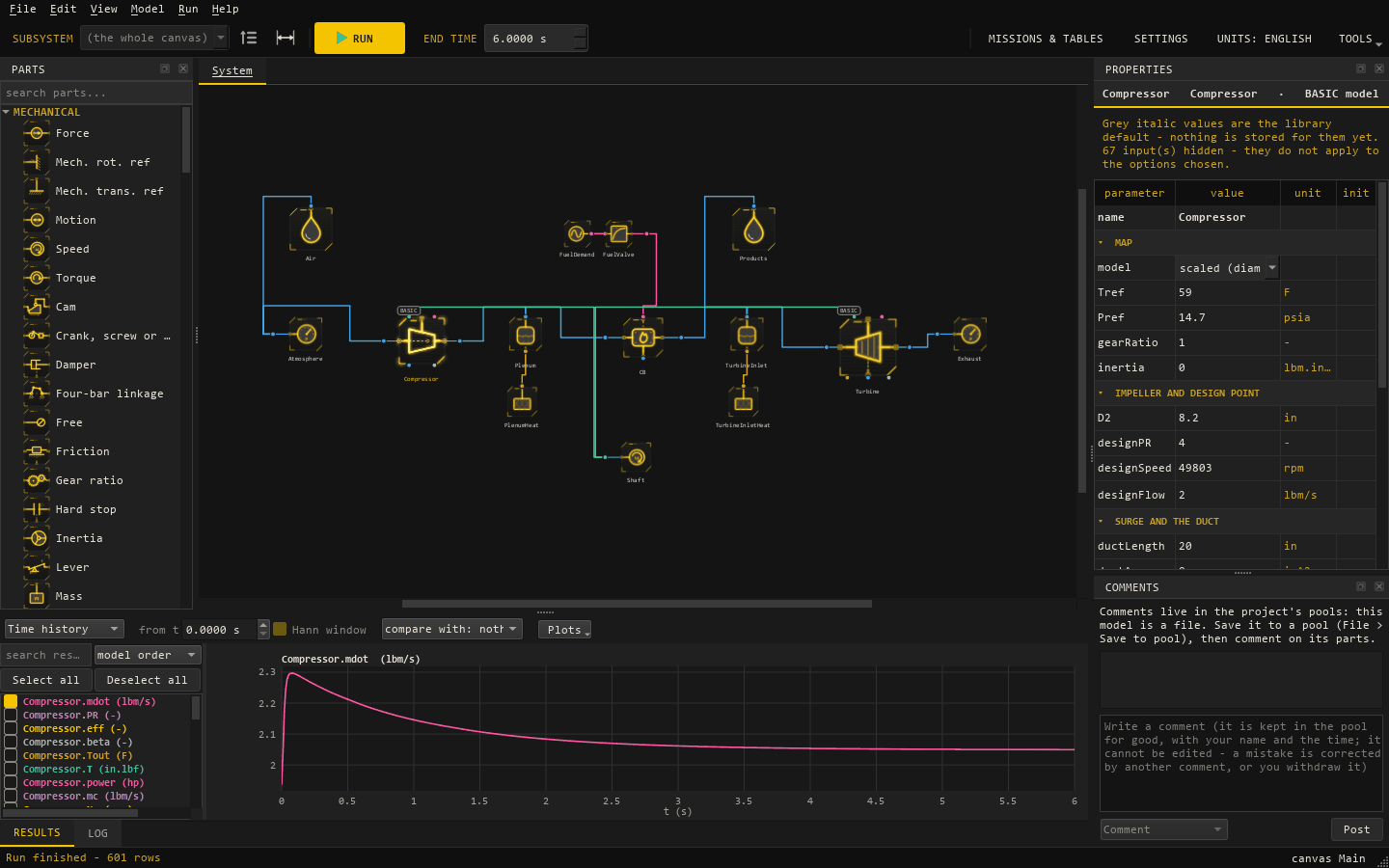
One model, every physics. Mechanical, electrical, thermal, fluid, magnetic, control, and logic parts on one canvas, solved together in time: a motor’s losses heat its winding, its torque turns a gearbox that churns its oil, and its drive draws on a DC link that a brake chopper protects — all in one run. More than a hundred parts, each checked against exact answers.
- Mechanical — masses, springs, dampers, stick-slip friction, hard stops, gears, levers, cams, linkages
- Electrical — batteries, switches, fuses, breakers, power electronics; DC, brushless, induction, stepper, reluctance, wound-field, and bearingless machines and their drives
- Thermal — conduction, convection, radiation; every part that loses power has a heat port
- Fluid — liquids and real gases: pipes, valves, accumulators, pumps, compressors, combustors, turbines, heat exchangers
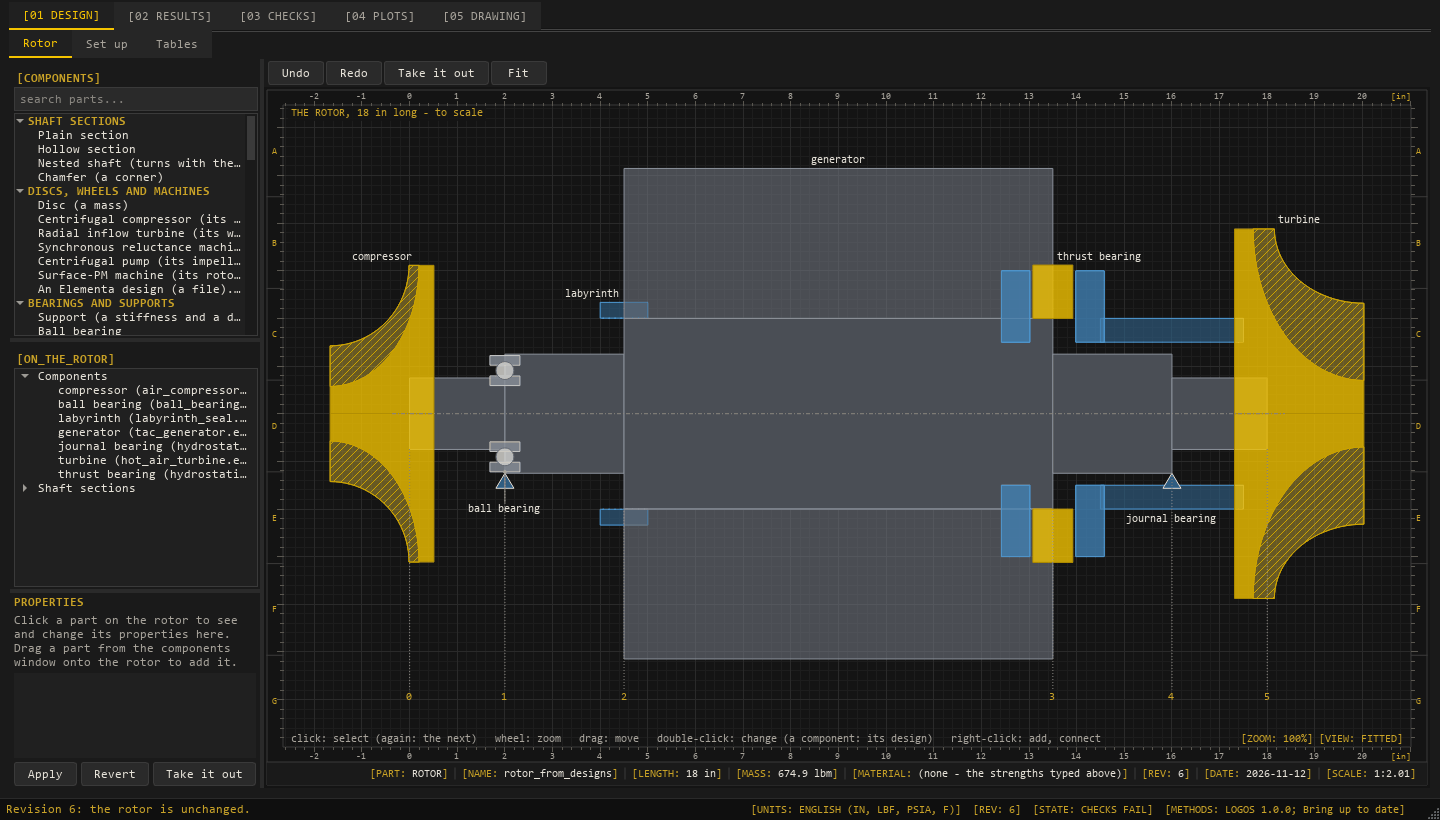
- Rotating machinery — rolling, film, hydrostatic, and magnetic bearings, seals, and windage, on shafts that whirl
- Controls and logic — PID, transfer functions, state space, tables, latches, timers, interlocks
- Missions, property tables, and maps; SI, English, or your own units
- Every parameter labelled in plain words; mistakes shown before you run
- Saved work keeps its answers: an update never moves one on its own
- Command-line runs; compare any two runs by CSV
- FMU export — a model as an FMU (FMI 3.0 or 2.0 Co-Simulation, Windows) for another program to run, with LOGOS’s own solver inside; a signal input can change at every step without the model being built again. Every exported FMU is checked against the FMI standard’s own schemas and rules, and run in FMPy, an open FMI importer
- Python — the
logospackage opens, runs, sweeps, and builds models and gives the results as arrays (with the AI and command-line add-on) - Power electronics and drives — switched and multilevel legs on their gates, a cable with its reflections, the machines’ common-mode paths, a machine of several winding sets, and a drive’s controller from blocks, with a digital controller’s timing
- Link by a click — pick a part in Systema for a requirement in Kanon or a task in Hodos
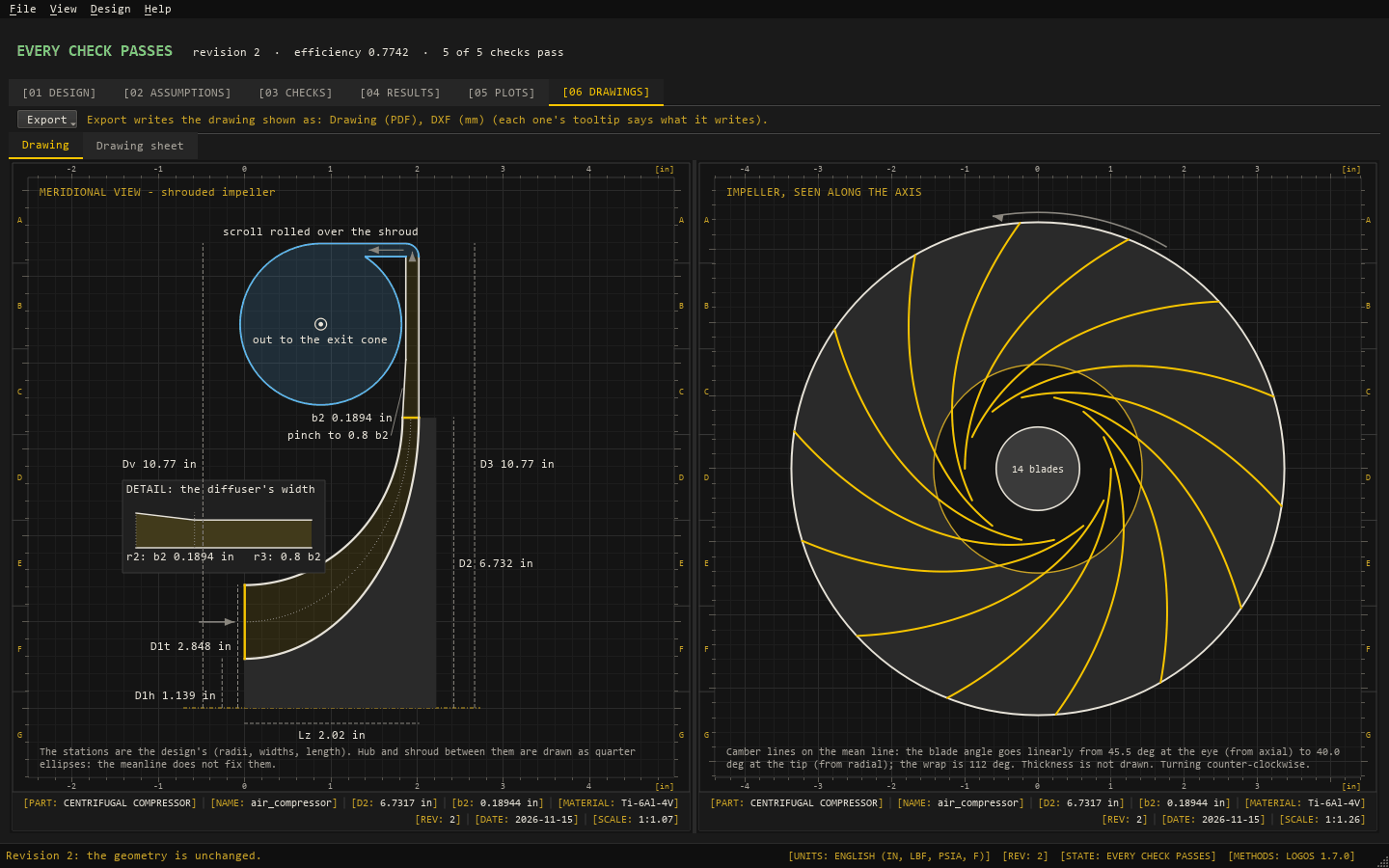
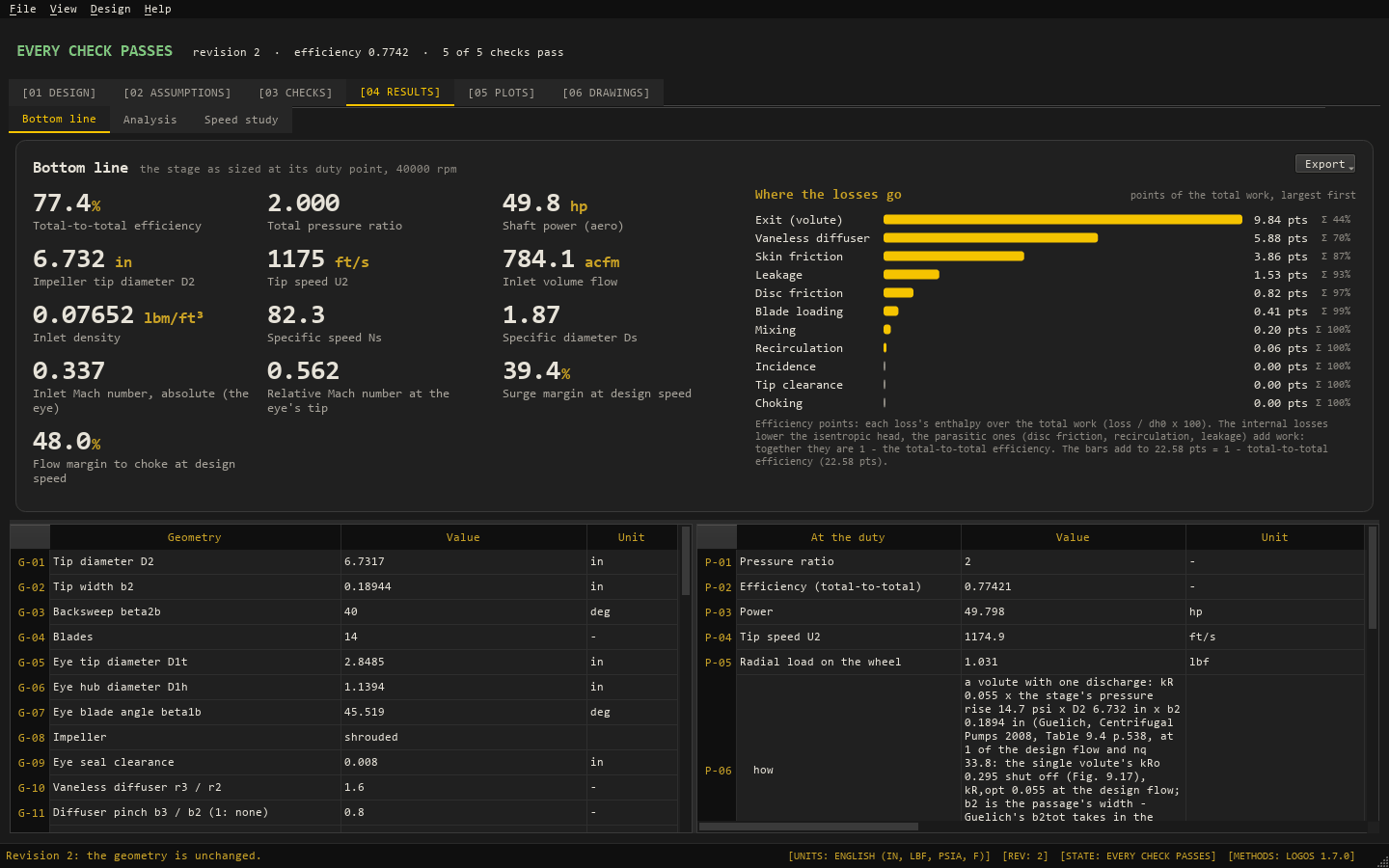
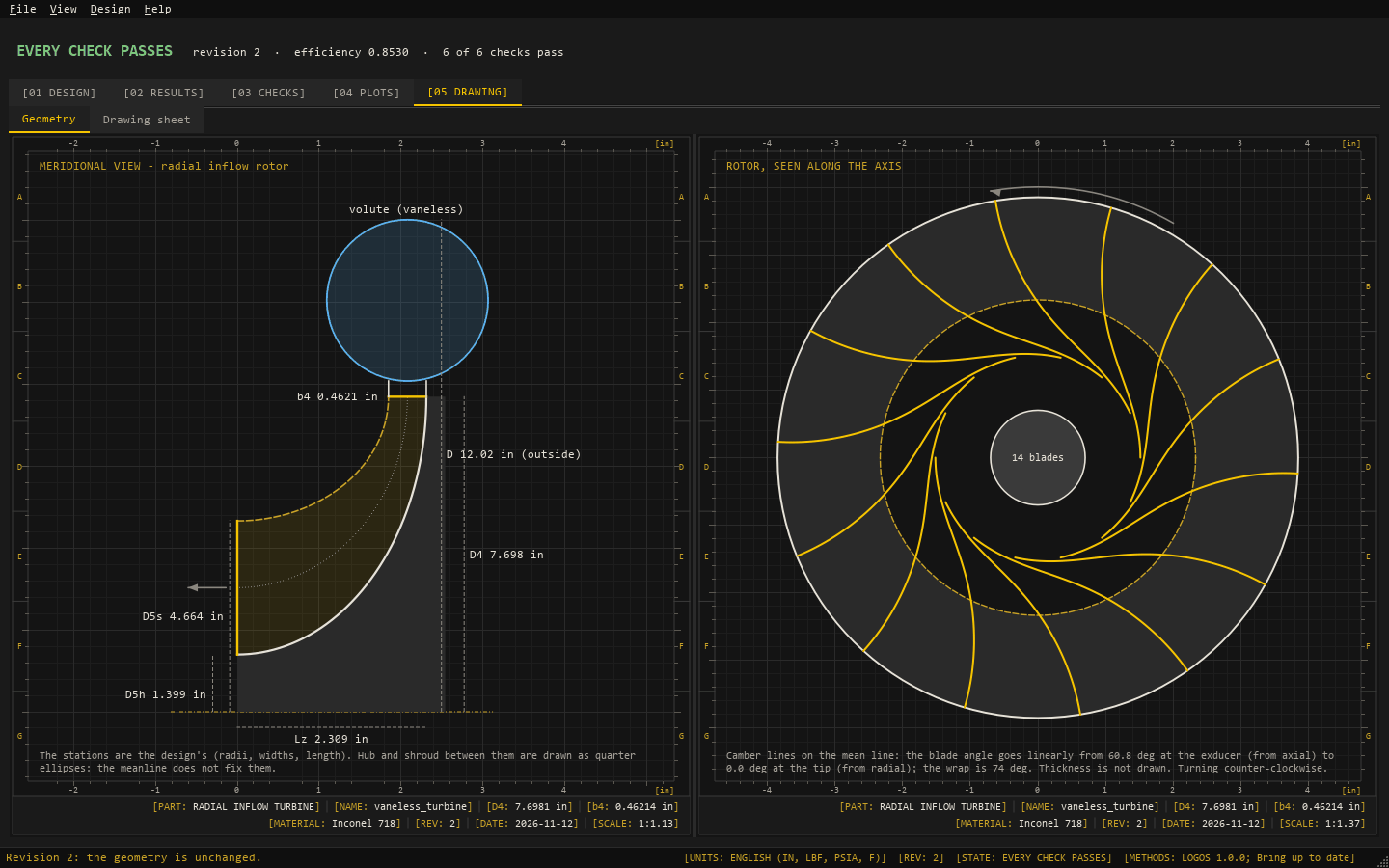
Detailed design, inside Systema. Double-click a part to design it: size it for its duty points, check it against its limits, and apply it, so the design drives the part in the system. A part runs basic (a few parameters), detailed (from its design), or calibrated (fitted to test data). You can design:
- Centrifugal compressors, with the map, a pinched diffuser, and a rolled volute (LOGOS 1.6); radial turbines with or without vanes (vaneless: LOGOS 1.6); axial compressors, turbines, and pumps; centrifugal and Barske pumps
- Electric machines, with their flux-density maps
- Ball, oil-film, hydrostatic, porous, and grooved gas bearings, with their film maps; seals; heat exchangers; gear pairs (AGMA 2001 or ISO 6336)
- The whole rotor: critical speeds, stability, unbalance response, thrust, clearances, torsion, and the machine’s losses
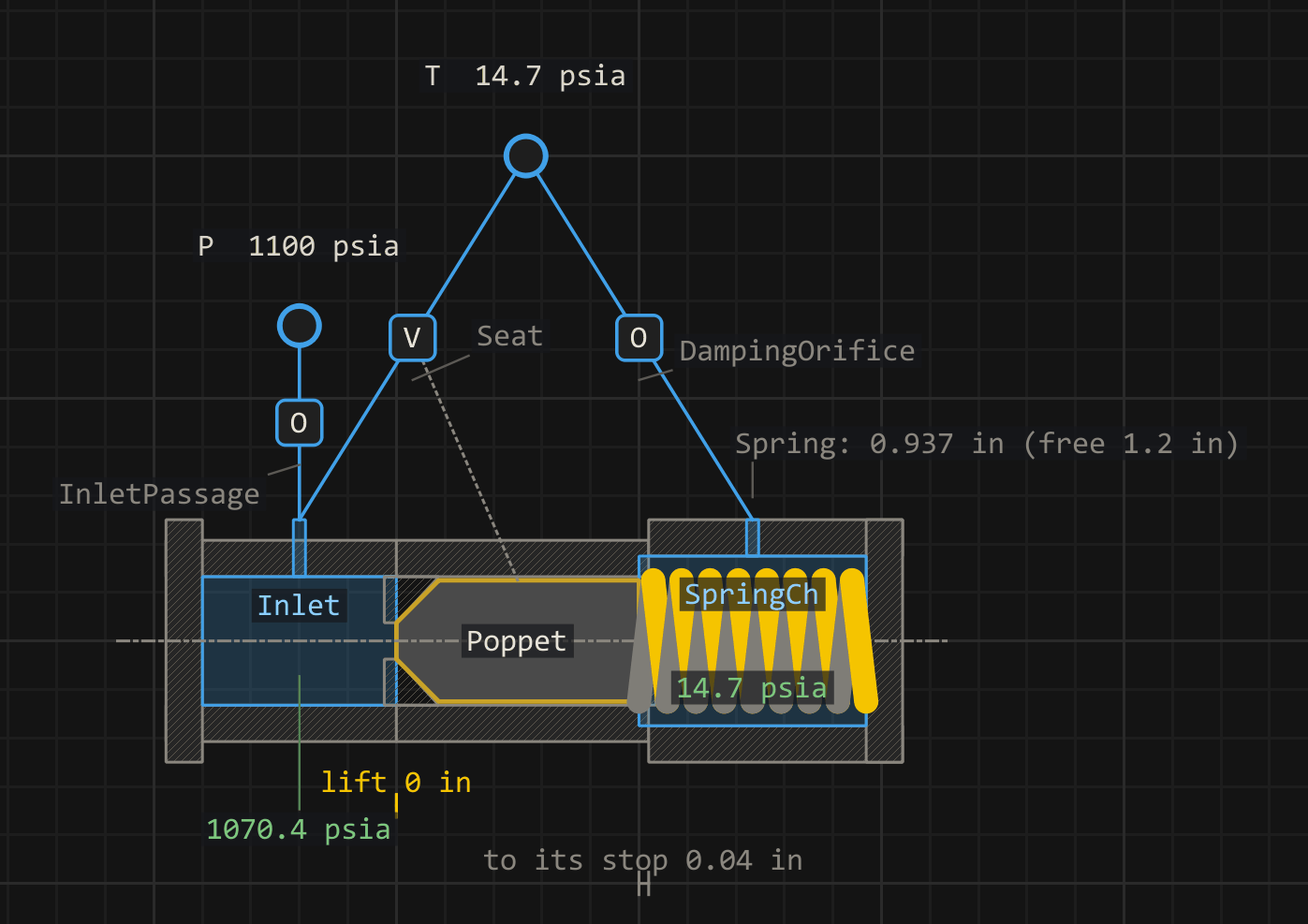
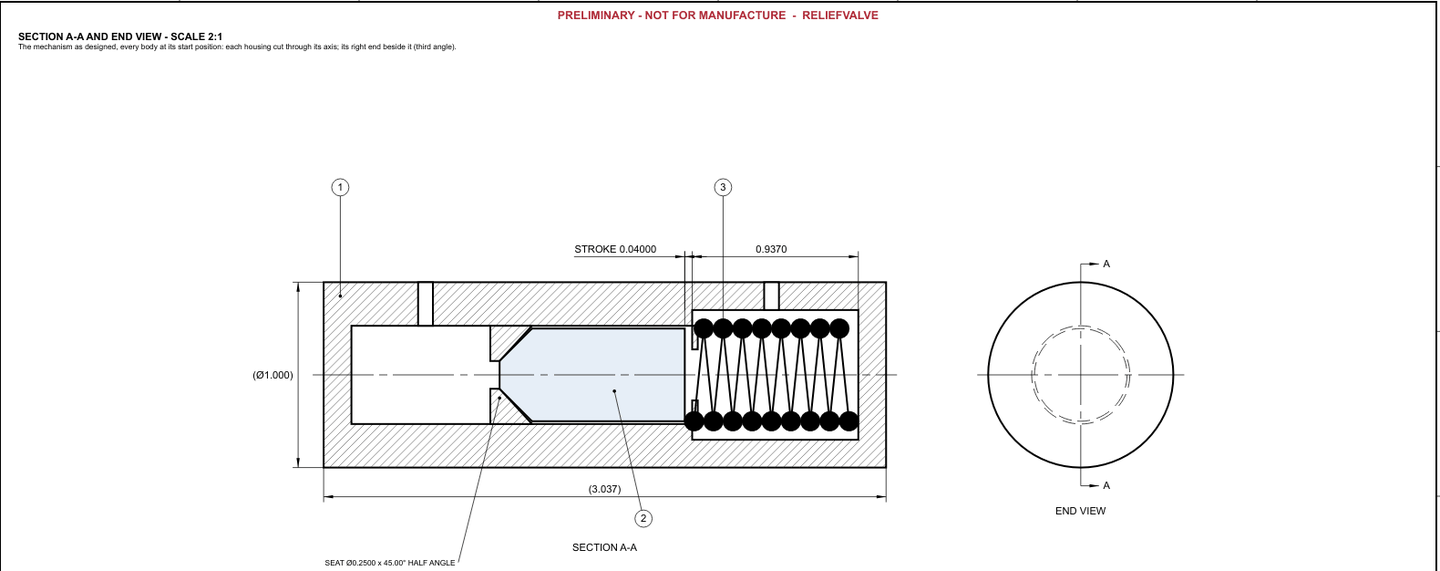
- Valves and actuators, with the mechanism tool and its engineering drawing
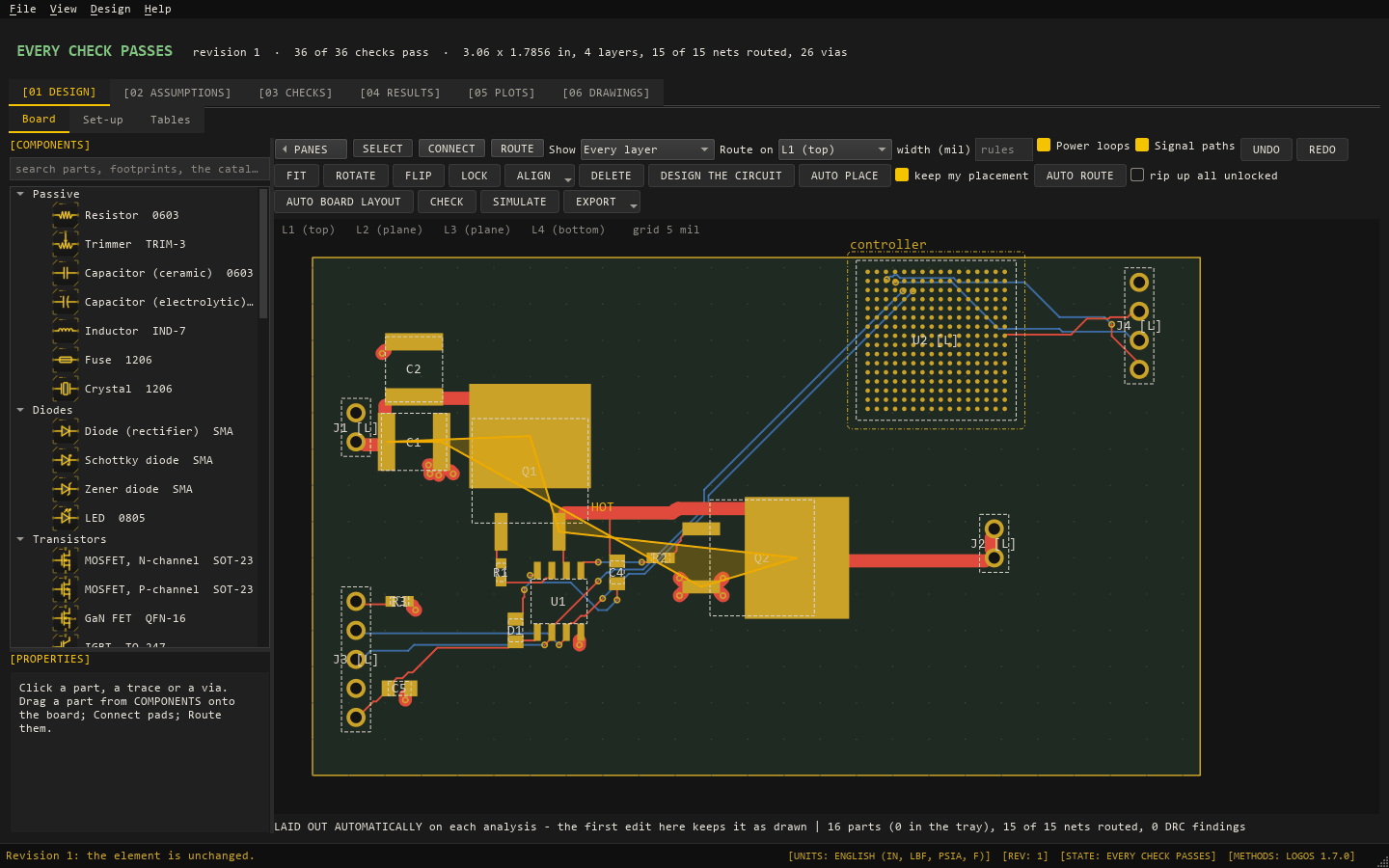
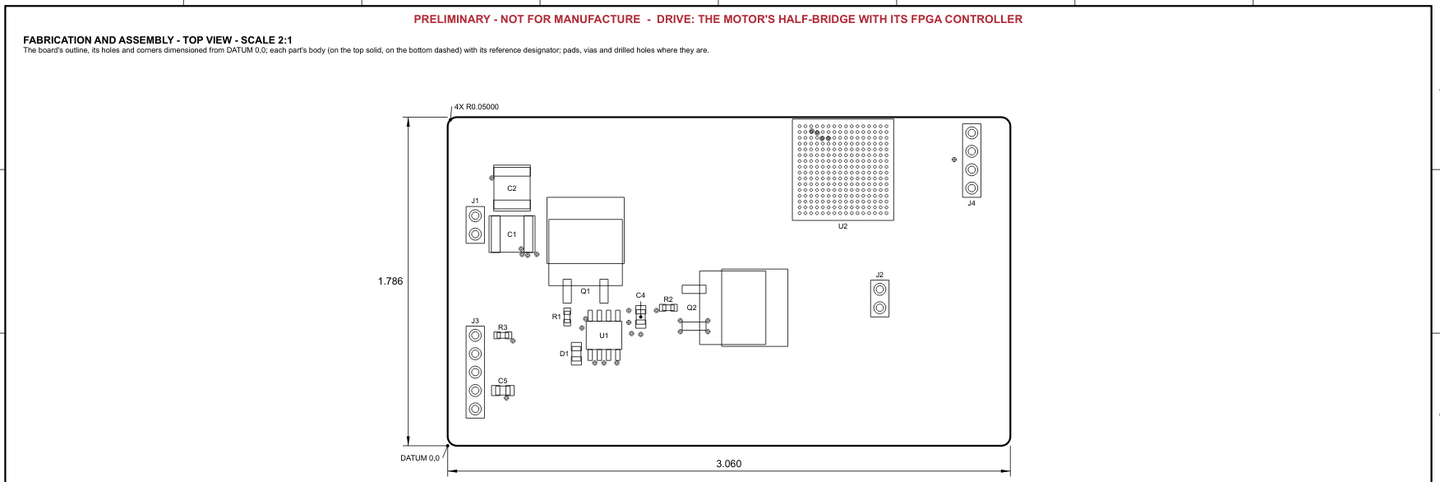
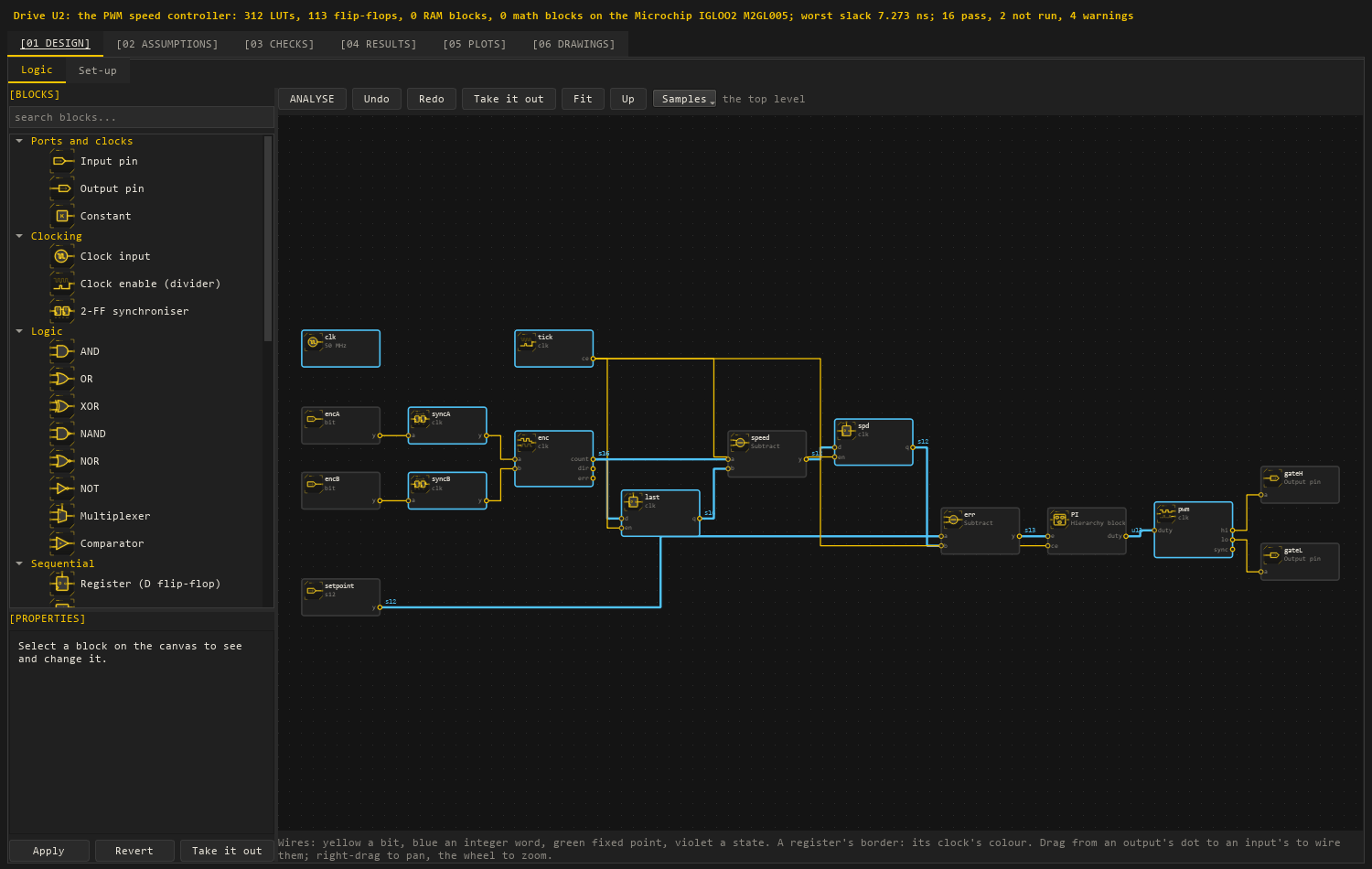
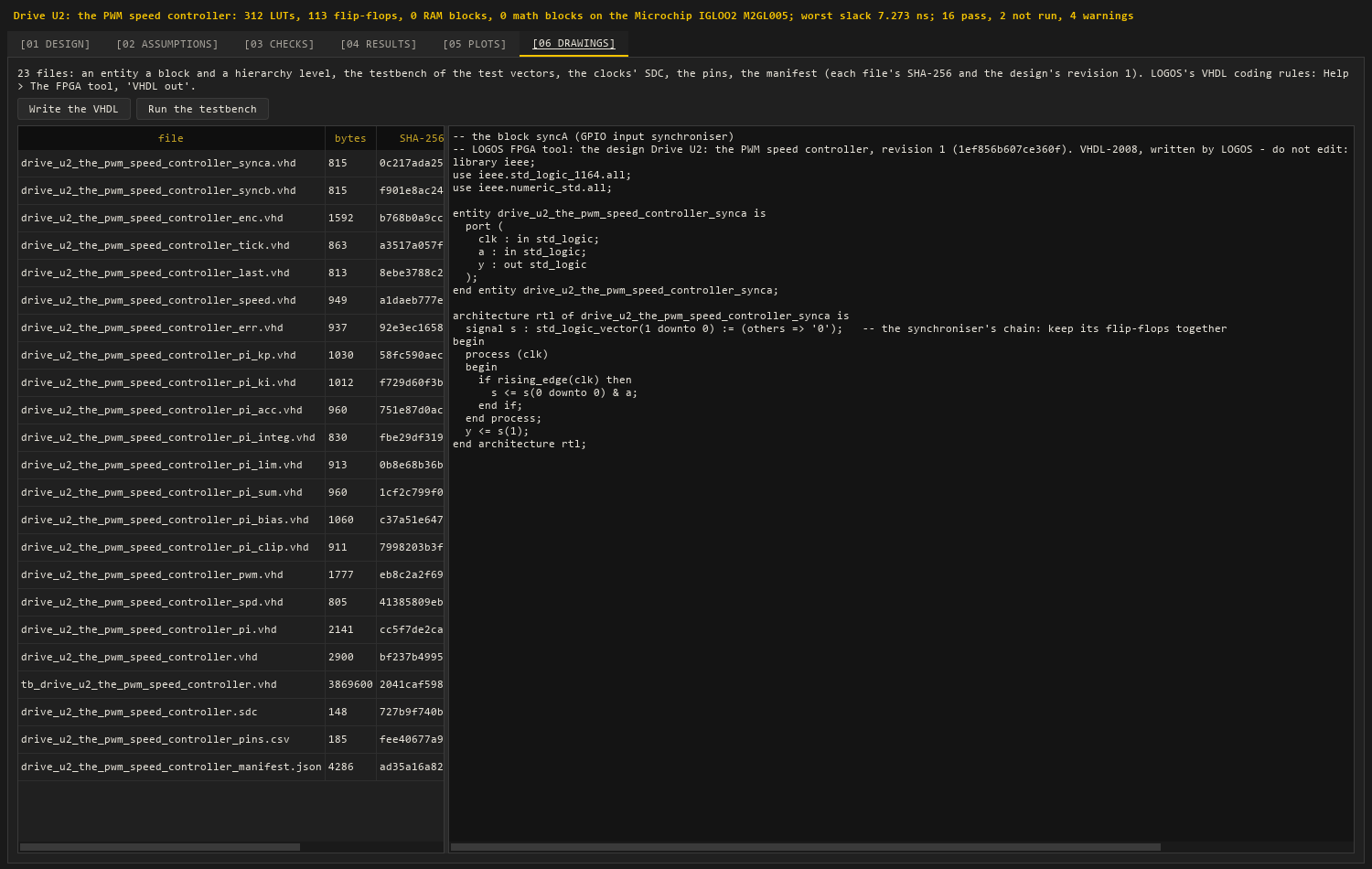
- Circuit boards, placed, routed, simulated, and drawn; an FPGA’s logic as blocks, written out as VHDL, and run cycle by cycle inside the system model
- Cables and pipe runs, each with its cost from a price table you keep, sent to the plan’s bill of material
- A radial wheel’s blades as 3-D geometry (STEP) for CAD and CFD
With an AI tool of your own. LOGOS installs read-only context files so your AI tool can build, run, and check a model with you, through the command-line tools or the Python package. LOGOS itself contains no AI and sends nothing anywhere.
LOGOS Kanon LOGOSKanon.exe
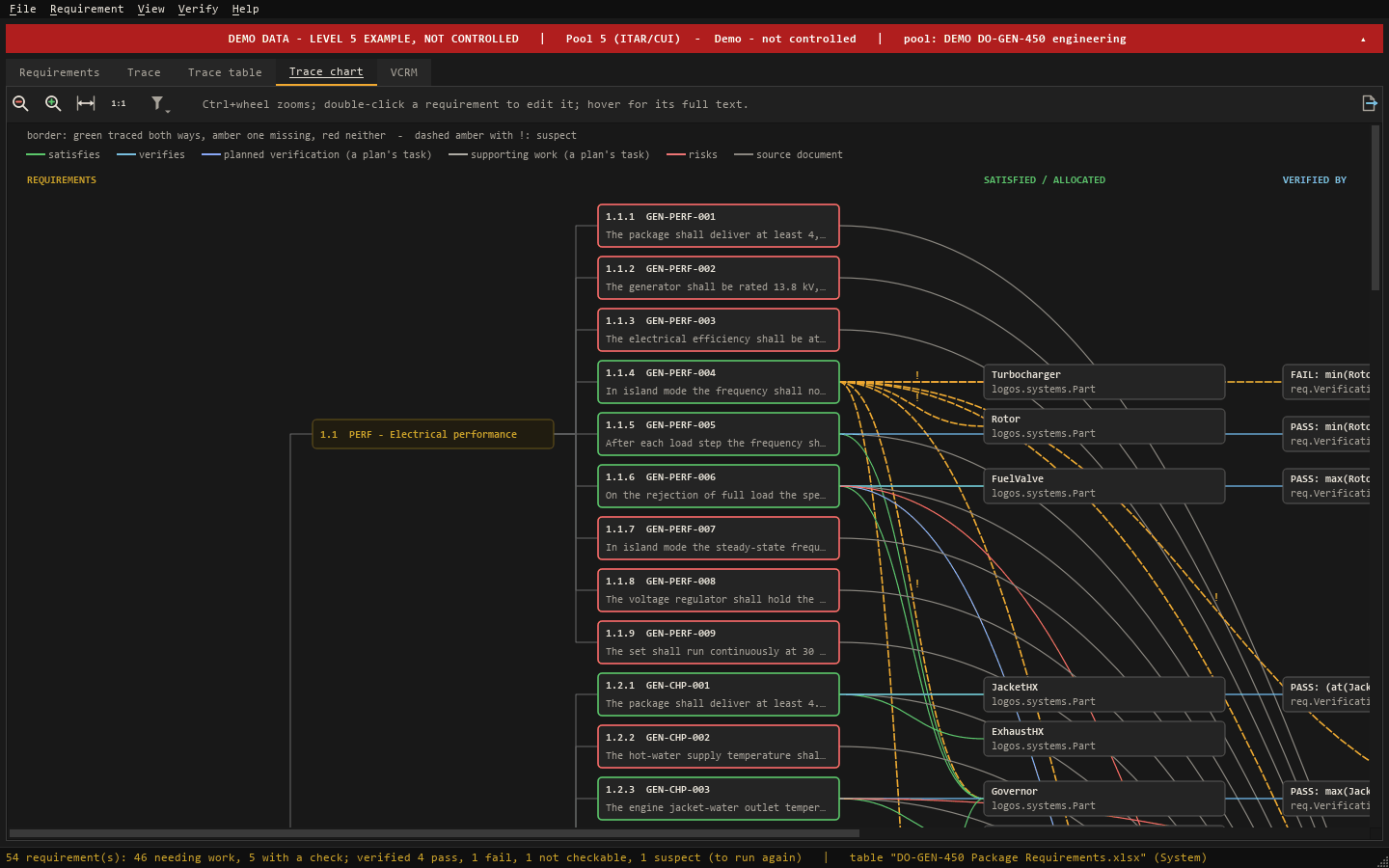
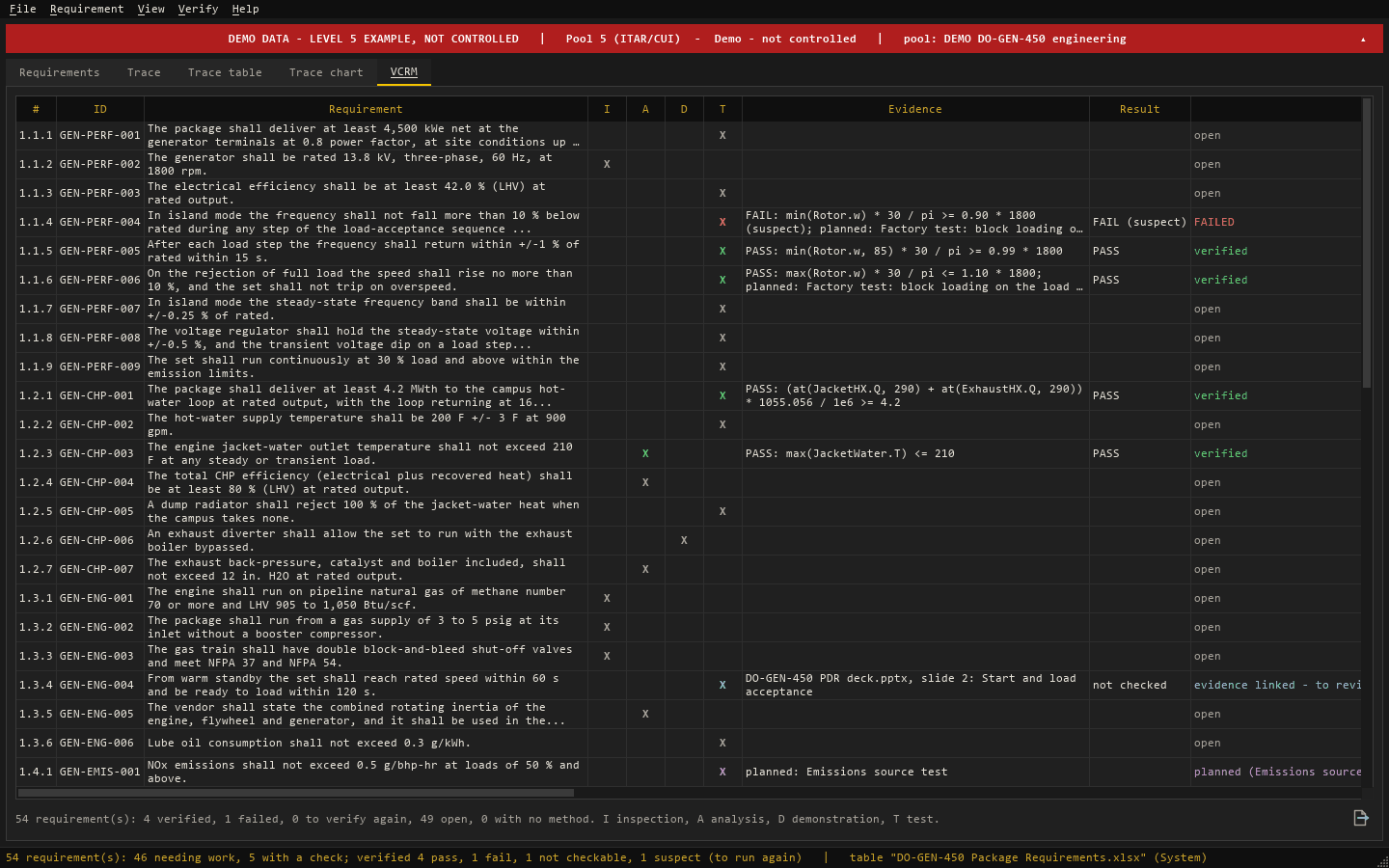
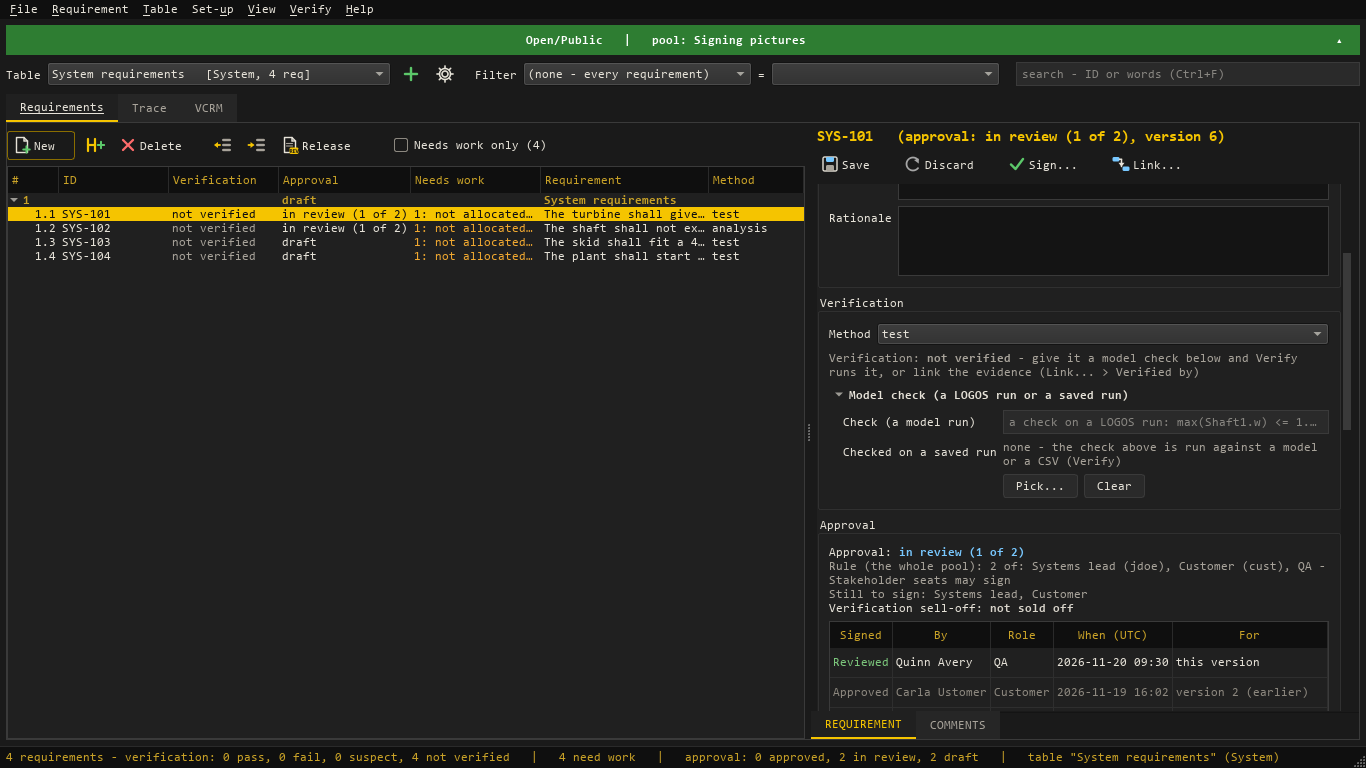
Kanon (Greek: the measuring rule) keeps every requirement in the data pool, tied to the evidence that it is met.
- Import a specification — Word, PDF, Excel, CSV, or text, read on your PC; you review each requirement before it is saved
- Needs work flags a weak shall, vague words (TBD, adequate), and no verification method
- Verified by the model — a check on a Systema run records PASS or FAIL as evidence
- A link goes suspect when either end changes
- ReqIF in and out — import from your requirements tool, with a preview; the next version updates the requirements, never duplicates them; export them back with the verification beside each — pass or fail, the margin, and the run. Tried on 25 public sample files that other tools wrote; a file that breaks the standard is read with each repair listed; every export is valid against the OMG ReqIF 1.2 schema
- Approval by signatures — named reviewers sign, one or many at once, each signature bound to the exact version and kept for good; the signer proves who they are at every signing (to your LOGOS Server or your organisation’s own sign-in); releases and the customer’s sell-off of a verification are signed the same way
- The verification matrix to Excel or CSV, laid out as a specification’s section 4, with the pool’s classification marking; trace table and chart; numbered, revisioned Excel and Word releases
LOGOS Hodos LOGOSHodos.exe
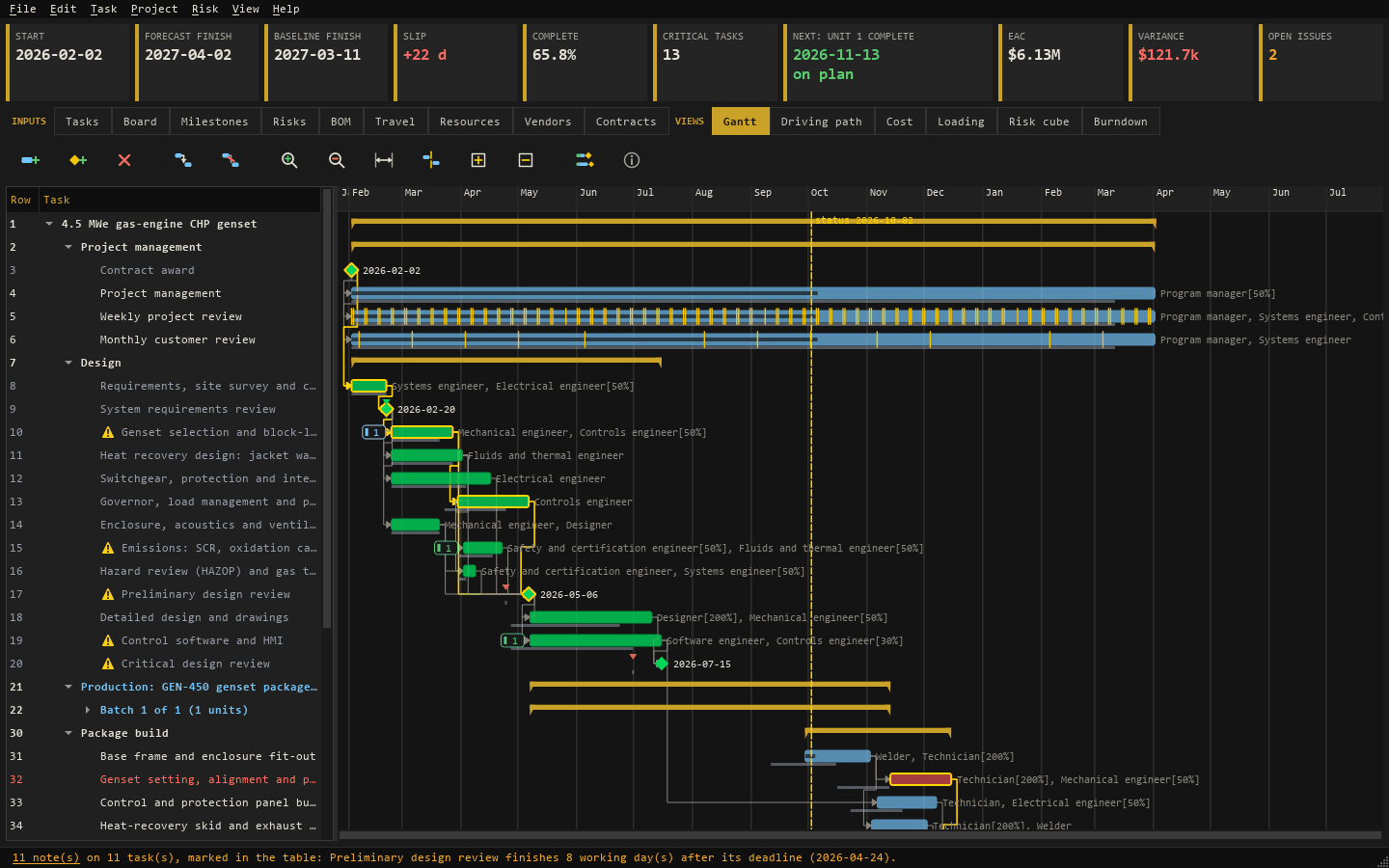
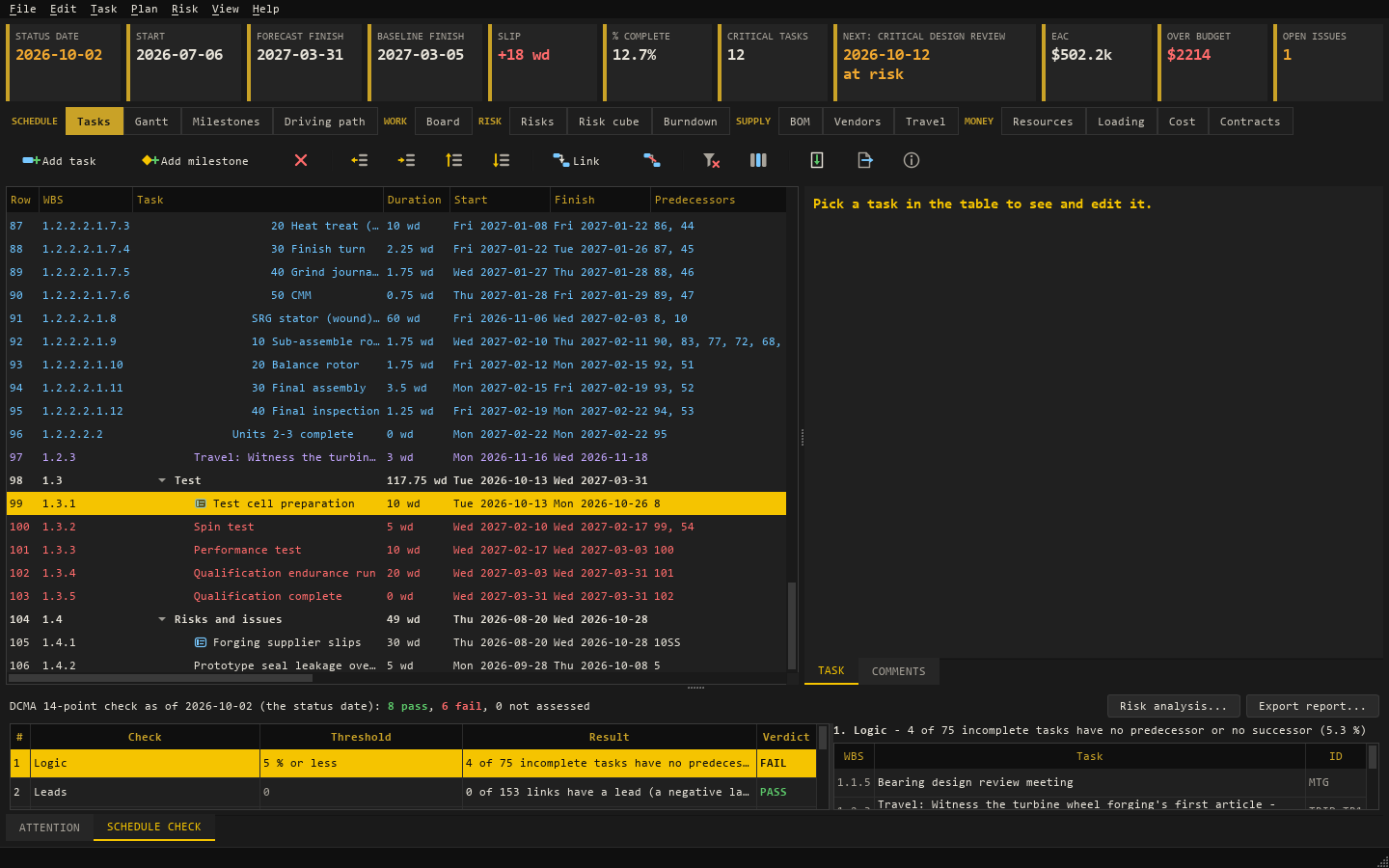
The plan, the money, the parts, and the risks: a Gantt chart with the driving path, resources and earned value, milestones with risk gates, and a bill of material built from the model.
- Risks: the register, the risk cube (MIL-STD-882), the burndown; each mitigation step tied to a task, so a late task shows as a risk not burning down
- Schedule check — the DCMA 14 points, each PASS, FAIL, or not assessed with the reason
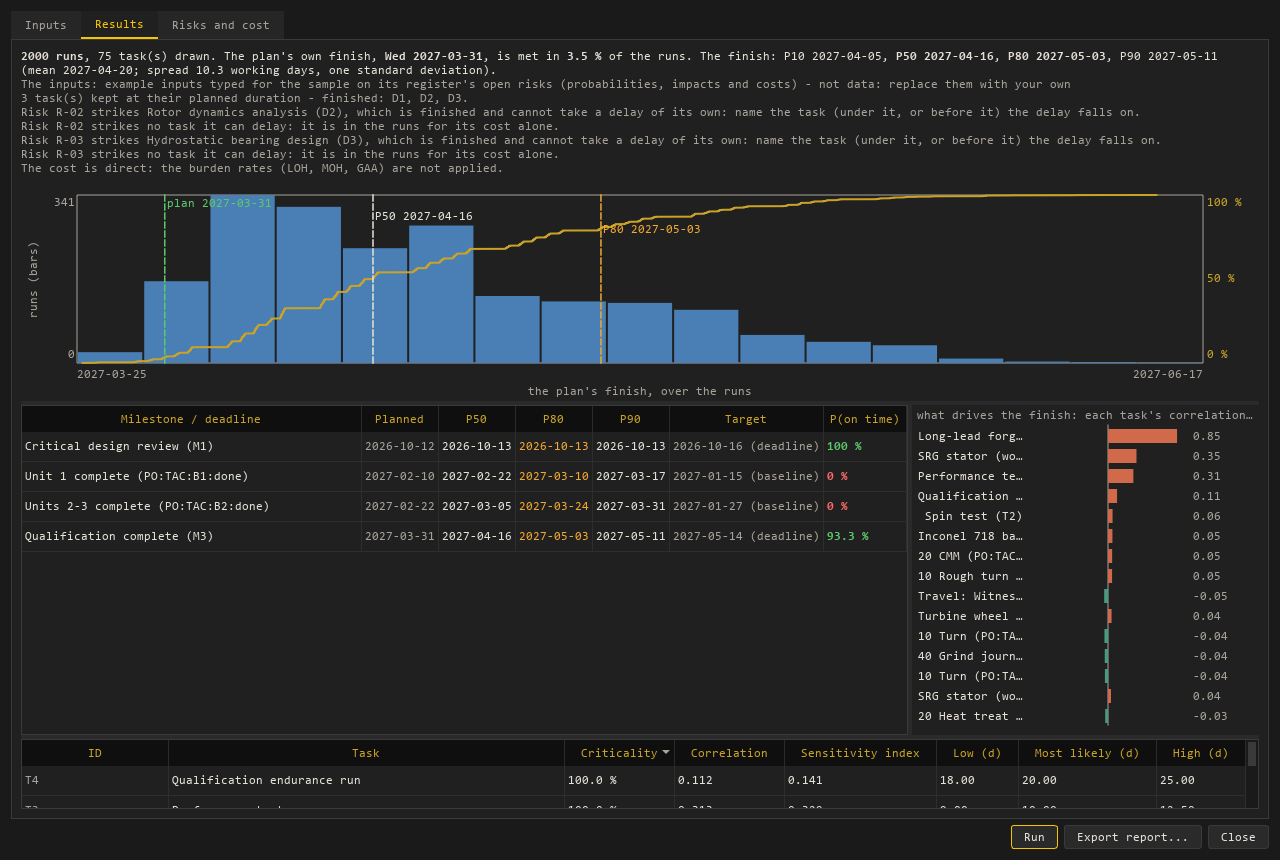
- Schedule risk analysis — Monte Carlo on the plan and its risks: the finish from P10 to P90, each milestone’s chance of its deadline, and the tasks that drive the spread
- Milestone reviews with a checklist and two signatures; a change to a baseline needs a reason, kept in a chained record
- Cost risk from the same runs, with the joint confidence level of cost and finish; the risks ranked by what each adds to the finish
- A board for the team; the BoM with routings and orders; export to Excel; plans to and from Microsoft Project (XML, written to Microsoft’s published schema and checked against it), to Primavera P6 (XER), and the IPMDAR schedule dataset out and in
- Stakeholders see hours and dates, never labour rates
LOGOS Agora LOGOSAgora.exe
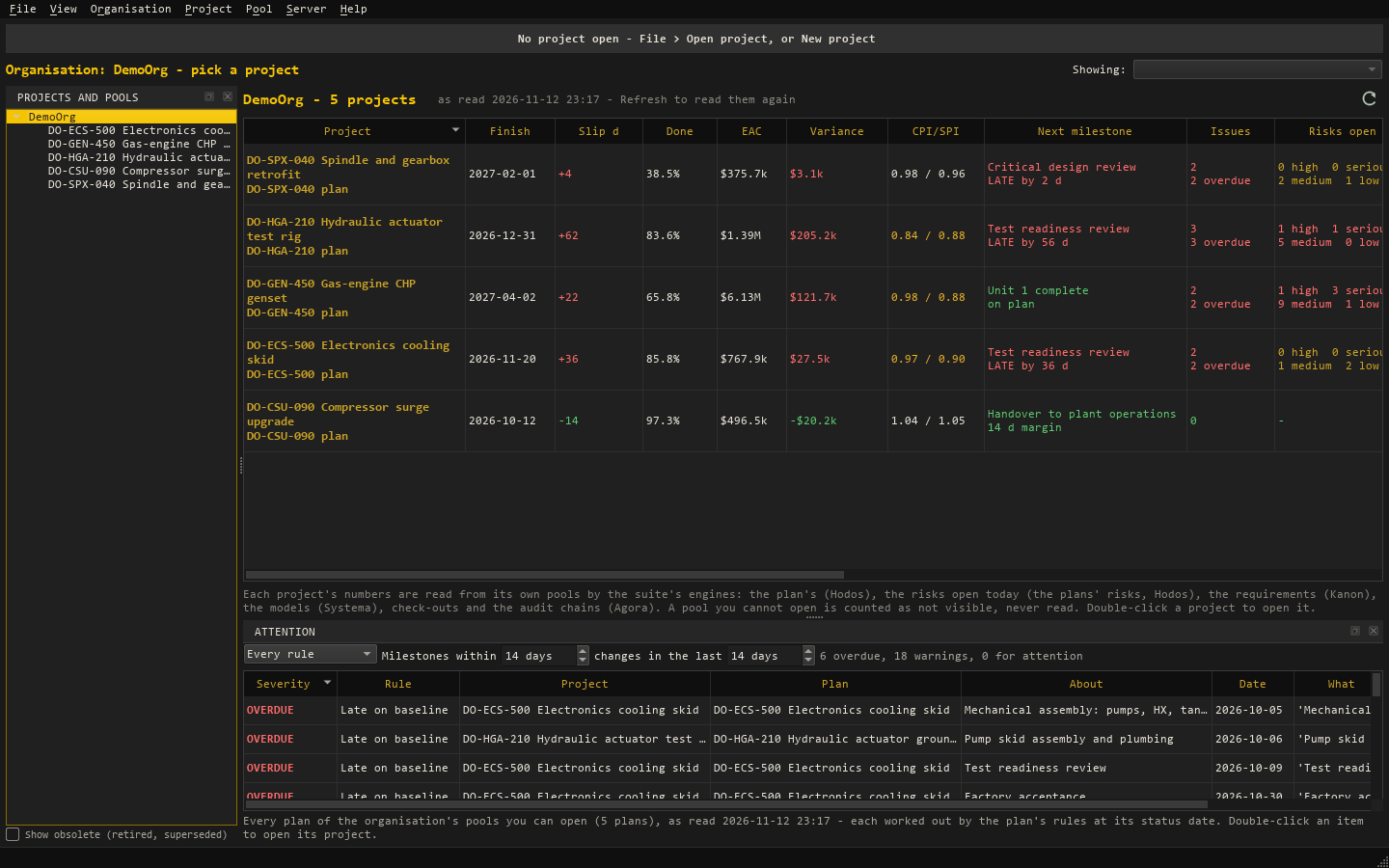
The window on your data pools: models, plans, requirements, and risks, versioned, with check-out and check-in, baselines, links, and a hash-chained audit log. The organisation view rolls up every project’s schedule, cost, and risk.
- An overview of each project, and its journal open to every member
- Show in LOGOS Agora from Systema, Hodos, and Kanon
- A pool is one file on your own storage — or on your own LOGOS Server
- Classification banners that can only be raised
- Reconcile two lines of work change by change
- Every comment on a model’s parts in one place
Traceability you can show an auditor
From a specification to a baseline, every link kept
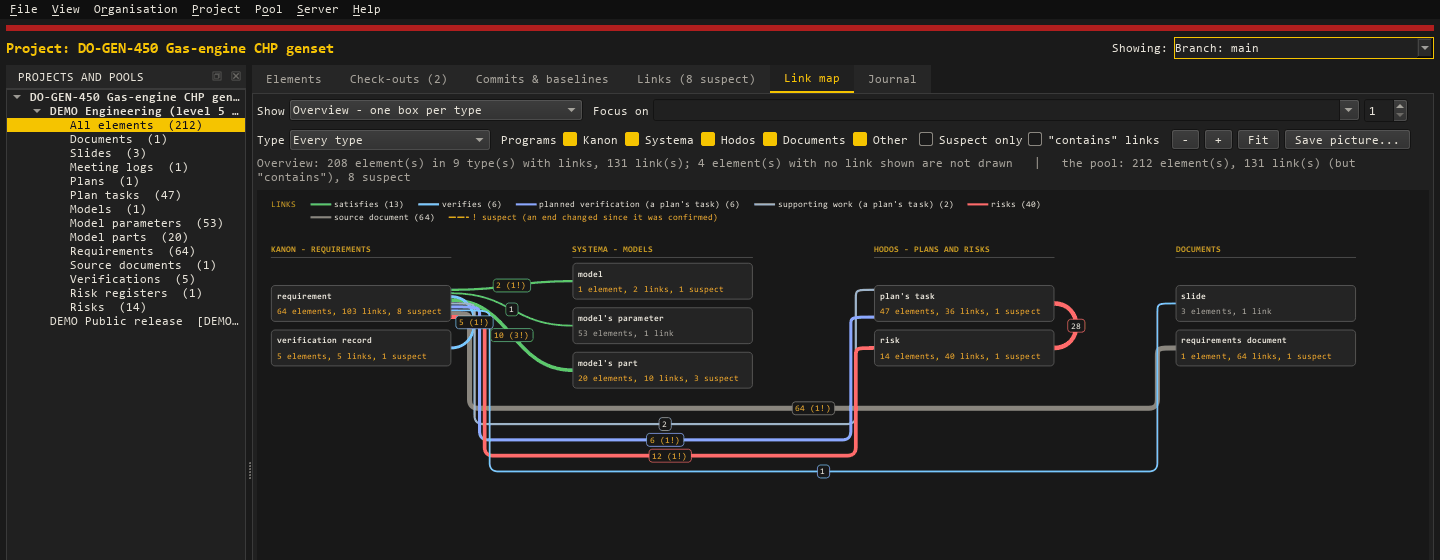
Every link is kept in the pool. Change a source document and the links that depend on it turn suspect until someone checks them.
A baseline freezes it all at a design review. The audit log records who changed what, from which machine, and when. Nothing is deleted: a change is a new version.
Security & deployment
CMMC Level 2: offline, no telemetry, your data on your own storage
- Nothing phones home. No telemetry, no update check, no licence check-in. Only a bug report a person sends reaches us, and IT can turn that off.
- Offline and air-gapped. Each PC is activated once, by file.
- Your data stays yours, in pool files on storage you already approve, or on your own LOGOS Server.
- IT-friendly. Signed Windows x64 programs, an MSI installer, a CycloneDX SBOM with every file’s hash, group-policy switches, and a security summary for IT.
- LOGOS Server. Sign-in with Microsoft Entra ID (commercial or GCC High), Okta, Google, AD FS, or Keycloak; rights checked on every call; HTTPS only; a keyed audit chain (HMAC-SHA256) you can copy to your SIEM.
- Slack and Teams get only Open data unless an administrator raises a project’s level; one setting turns them off.
- Between the programs on a PC, a click in one fills a link in another through a Windows named pipe open to that Windows user only: nothing on the network, no file content. One policy turns it off.
- Signatures are re-authenticated at every signing, checked by your LOGOS Server or your identity provider, and recorded with the SHA-256 of what was signed.
- FMUs and Python. An exported FMU carries LOGOS’s signed library and checks its own signature and licence; the Python package only starts LOGOS’s own signed tools and opens no port.
- For your assessor. Passwords use Argon2id, which is not FIPS-approved: confirm it with your C3PAO. For FIPS-mode TLS, put IIS or HTTP.sys in front of the server. A pool kept as a file on a share is protected by that file’s own permissions.
The details: Security and the IT guide, Updating LOGOS.
Roadmap
What we are building next
What we are building next for Systema. Plans, not promises: what our users ask for moves up.
- ToolsCircuit boards, FPGAs, cables
Board routing with timing simulation; more FPGA families; cable bundles with conducted EMI.
- Detailed designMore machines
Nested shafts, motor cooling and windings, mixed axial-radial flow paths, and more bearings, seals, and exchangers.
- NuclearTRISO sources and shielding
Heat sources for TRISO-fuelled cores, and shielding.
- ExchangeMore ways in and out
FMU import and Model Exchange; MATLAB beside Python; axial blade rows as 3-D geometry.
- PerformanceGPUs, NPUs
Large models and sweeps on GPUs; physics on the PC’s NPU.
Questions
How does the beta work?
Seats are not sold yet. Beta testers get a code from us: choose your seats, press Beta Tester, and enter the code at checkout. No payment is taken. Ask us to join.
We are beta testers or customers already. What changes?
Nothing until your renewal: your seats keep their terms, and every Full seat you hold now stays shared, as today. At the renewal the new terms apply; beta testers who convert have 40% off the first year.
Can a named seat move to someone else?
Yes: your LOGOS administrator moves it in the server’s web console, once every 30 days for each seat. When a person leaves and their account is removed, their seat moves at once. The console shows who holds each seat and when it can next move.
Can we try it first?
Yes — ask us for an evaluation key and a walk-through on your own problem.
Which add-on exports FMUs?
Either: the FMU add-on, or the AI and command-line add-on, which includes FMU export. Each is per person, on a Full seat or an individual licence. Enterprise has both for every Full seat. The PC that runs an exported FMU needs a LOGOS licence with one of them.
Can we script LOGOS?
Yes: the Python package logos, installed with LOGOS, opens, runs, sweeps, and builds models and gives the results as arrays. It drives LOGOS’s own command-line tools, so it needs the AI and command-line add-on, or a sign-in to your LOGOS Server for those tools.
Which requirements tools does Kanon exchange with?
Any that reads and writes ReqIF 1.2. Kanon was tried on 25 public sample files that other tools wrote, and every file it writes is valid against the OMG schema. Send us an export from your own tool and we will read it with you before you buy.
Can our planners exchange schedules?
Yes: Hodos writes and reads Microsoft Project XML (written to Microsoft’s published schema and checked against it), writes Primavera P6 XER, and writes and reads the IPMDAR schedule dataset. An import shows what it adds, changes, and drops before anything changes.
Will an update change our results?
Not on its own. Every model and design keeps the calculation methods it was made with. Only a bug fix can move a saved answer, and the release notes name each one. Bring up to date shows what newer methods would move before anything changes.
Does LOGOS need the internet?
No. Each PC is activated once, from any connected computer or by email. With your own LOGOS Server, the programs talk to it over HTTPS on your network.
Which Windows versions?
64-bit Windows on x64 PCs.
Report a bug or request a feature
The fastest way is Help → Report a bug in the program, which can attach the log. Or use this form: