
Last updated: November 21, 2026
LOGOS runs inside engineering organisations, many of them on managed or air-gapped networks. This page says how to report a security problem to us, what we do about it, how releases are published and checked, and where fixed problems are listed.
Reporting a vulnerability
Write to security@logosmodular.com. Please include the product and version (Help → About, or the LOGOS Server console’s Settings → Updates), what you found, and the steps to reproduce it. Do not send customer data, models, or pool files; if the report needs a sensitive attachment, ask first and we will arrange a safe way to send it.
- We acknowledge a report within 3 business days and tell you who is handling it.
- We assess it and tell you what we found, normally within 10 business days.
- We fix confirmed problems in a release, publish an advisory below, and credit you if you wish.
- We ask that you give us up to 90 days before publishing details, or until a fixed release is out if that is sooner.
Scope and good-faith research
In scope: the LOGOS programs (Systema, Kanon, Hodos, and Agora; LOGOS Kindynos, part of Hodos since 0.14.0, for the versions that still have it), the LOGOS Server and its web console, the licensing service at licensing.logosmodular.com, and this website. Test the programs and the LOGOS Server on your own installation.
We will not take legal action against research done in good faith under these rules: no access to, change, or deletion of other people’s data; no denial-of-service or load testing of our services; no social engineering of our staff or customers; no physical attacks; and stop and tell us as soon as you reach data that is not yours. We do not run a paid bounty program.
Security advisories
Each fixed vulnerability is listed here with the versions affected, the version that fixes it, its severity, and what to do. Customers with an active licence are also told in the update notice of the release that fixes it, and anyone can have each advisory by email (below).
Security advisories by email
Free, for anyone — your IT and security staff too. We email each new advisory on this page, and nothing else. You confirm by a link we email first, and every advisory has a link to leave the list. We keep only the address and when it confirmed (privacy policy). Customers can also tick it in My Account > LOGOS licences, for themselves and their update contacts.
A few emails a year at most. No tracking: no pictures, no counted opens or clicks.
LSA-2026-07 – LOGOS Server: a person with no right for a program could learn about its elements
Affected: LOGOS Server 0.13.0 to 1.4.1. Fixed in: 1.5.0 (2026-11-12). Severity: Medium (CVSS 3.1 5.4, AV:N/AC:L/PR:L/UI:N/S:U/C:L/I:L/A:N).
An organisation can give a person no right for one program in a project (say, None for LOGOS Hodos) while they work in the others. Such a person never received that program’s elements, but through the pool’s calls, which any signed-in client can send, they did receive things about them: the elements’ links (their ids, and their links to elements the person may see), the audit rows that made them, and the commits, check-outs, branches and files that were theirs – with their authors, times, commit messages and check-out notes. They could also make a link to a hidden element, and the call’s success told them it existed. They could not read the elements themselves. 1.5.0 filters every read by the same rule as the elements: a link only when both its ends may be seen, a commit, check-out, branch or file only when it is not about hidden elements alone, and an answer about a hidden element reads exactly as one about an element that does not exist. Making a link needs the right to change one end and to read the other.
What to do: update the LOGOS Server; the programs need no change for this. If people with a right of None for a program could reach the server, look in each shared pool’s audit log for links they made, and remove any to elements they may not see.
LSA-2026-06 – LOGOS Server: the identity provider’s secret sealed with a fixed value
Affected: LOGOS Server 0.14.0 to 1.3.0, where sign-in through an identity provider is set up. Fixed in: 1.4.0 (2026-11-07). Severity: Medium.
The server keeps the client secret it uses with your identity provider (OpenID Connect) sealed by Windows DPAPI. The seal used a value built into the program, the same on every server, so any process on the server machine that could read the server’s database could unseal the secret. 1.4.0 seals it with this installation’s own random value, as the server’s other secrets are, and seals a saved secret again the new way when it first starts.
What to do: update the LOGOS Server. If a copy of the server’s data folder may have left your control, make a new client secret at your identity provider and enter it in the web console. (A server put back to 1.3.0 after updating needs the secret entered again.)
LSA-2026-05 – LOGOS Server: “copy up only” trusted a level the program gave
Affected: LOGOS Server up to 1.3.0. Fixed in: 1.4.0 (2026-11-07). Severity: Medium.
Elements may be copied from a pool into a pool of the same or a higher data level, never lower. The server took the level of what was copied from the copy itself when it could not match its source pool, so a person cleared for a higher pool, using a changed program, could copy its elements into a lower pool. 1.4.0 seals each copy the server hands out (a keyed check over its source pool, its level and its elements) and trusts the level only from a good seal; anything it cannot vouch for is taken at the highest level of the pools that person is cleared for.
What to do: update the LOGOS Server, and the programs: a person cleared above Open who copies into a lower pool with a 1.3.0 program is refused and asked to use 1.4.0.
LSA-2026-04 – LOGOS Server: large requests accepted before sign-in
Affected: LOGOS Server 0.12.0 to 0.13.0. Fixed in: 0.14.0 (2026-10-25). Severity: Medium.
The server’s HTTP library (cpp-httplib 0.18.3) had published advisories for unbounded request bodies, too many header fields and request smuggling, and the server accepted bodies of up to 256 MB on every route before sign-in. Someone who could reach the server could make it use a great deal of memory. 0.14.0 updates the library to 0.63.0 and limits each route’s request size before any of it is read: 64 KB for sign-in, and larger bodies only from a signed-in session.
What to do: update the LOGOS Server. Until then, keep it reachable only from your own network.
LSA-2026-03 – LOGOS programs: a look-alike address could be used over plain HTTP
Affected: the LOGOS programs 0.12.0 to 0.13.0. Fixed in: 0.14.0 (2026-10-25). Severity: Medium.
The programs allow plain HTTP only to the computer they run on. That check compared the start of the address, so an address such as http://127.0.0.1.example.com also passed, and a sign-in could be sent unencrypted to another machine. An organisation file could also change the server address without asking. 0.14.0 checks the host exactly (HTTPS anywhere; HTTP only to 127.0.0.1, localhost or [::1]), and an organisation file that would change the server asks first.
What to do: update the LOGOS programs. Open organisation files only from your administrator.
LSA-2026-02 – LOGOS Server: a Stakeholder could change shared work
Affected: LOGOS Server 0.12.0 to 0.13.0. Fixed in: 0.14.0 (2026-10-25). Severity: Medium.
The server let anyone with any right on a project write to its shared pools, so a signed-in Stakeholder (meant to view, comment and approve) could change models, plans and requirements. Stakeholders could also be sent a plan’s rates and costs. 0.14.0 checks each request against the person’s rights at that moment, makes a Stakeholder’s work read-only, and removes rates and costs from the plans a Stakeholder is sent.
What to do: update the LOGOS Server. To see whether anything was changed, look in each shared pool’s audit log, which records who changed what.
LSA-2026-01 – LOGOS Server: first-run set-up behind a reverse proxy
Affected: LOGOS Server 0.12.0. Fixed in: 0.12.1 (2026-10-12). Severity: High, for a server behind a proxy on the same machine that was reachable from the network before its administrator was made.
The first-run set-up, which makes the server’s administrator, is allowed only from the server machine itself, and the server judged that by the caller’s address. Behind an HTTPS proxy on the same machine (Caddy, as the guide sets it up), every caller has the machine’s own address. Until the administrator existed, anyone who could reach the server’s public address could have run the set-up and become its administrator. 0.12.1 never treats a request passed on by a proxy as local. A server that already had its administrator was not exposed.
What to do: update the LOGOS Server. Run the set-up in a browser on the server machine, at its local address, before opening it to the network. If your server was reachable before its set-up was done, check its administrator accounts in the server console.
Releases and updates
- LOGOS never updates itself. There is no update check in the programs and nothing is downloaded or installed in the background. Your IT department installs a release when it chooses.
- The installers are signed MSIs that install silently, so they can be pushed with Intune, Configuration Manager, or Group Policy. They are in My Account for an active licence.
- Every release is published with its SHA-256 checksums, a software bill of materials (CycloneDX), and the security summary for IT, so each can be checked before it is installed.
- A LOGOS Server that is online reads our public release list once a day and shows its administrator a notice when a newer release exists. An air-gapped server asks for nothing.
- An update never changes your files. Models, projects, organisation files, and pools are changed only by a person’s own save or by Agora’s check-out and check-in.
To check an installer before it is installed:
PS> Get-AuthenticodeSignature .\LOGOS-<version>.msi
PS> Get-FileHash .\LOGOS-<version>.msi  # compare with SHA256SUMS.txt
The individual licence: one person, two accounts
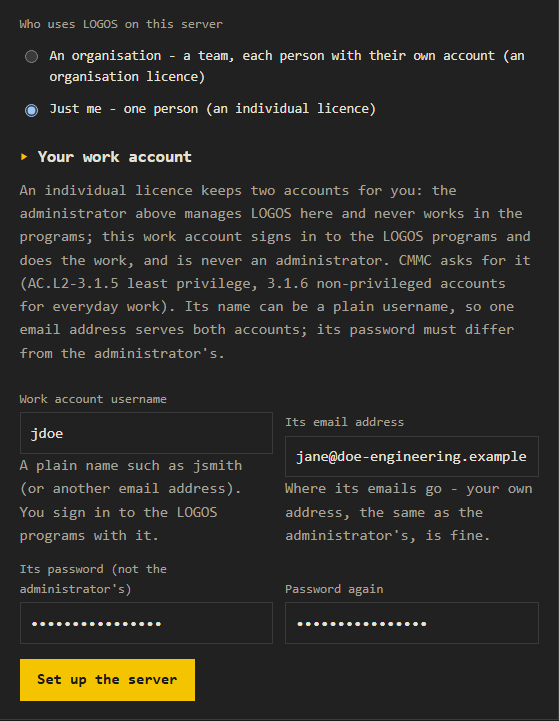
CMMC Level 2 asks that the account that manages a system is not the one used for everyday work (AC.L2-3.1.5, 3.1.6). So on your own LOGOS Server the individual licence keeps two accounts apart:
- An administrator account runs the server’s web console. It never signs in to the programs or takes a seat.
- A work account signs in to the programs. It is never an administrator.
- Both can use one email address, each with its own username and password; the server refuses the same password for both.
- No one else can be added. A team needs Full and Stakeholder seats.
Set-up is one page: choose Just me and the server makes both accounts. One person cannot meet separation of duties (3.1.4); the console says so, for your System Security Plan. A LOGOS Server before 1.4 takes the licence as one Full seat.
New for IT in LOGOS 1.8.2
- The local channel between the programs. So that a click in one LOGOS program can fill a link in another, the running Systema, Kanon, and Hodos of one Windows user find each other on that PC. Each opens one Windows named pipe whose access list holds only that user; no TCP or UDP port, nothing from another computer. A message carries ids and labels only — no file content, path, password, or token — and cannot make a program open, write, or send anything. The policy
LocalChannel= 0 turns it off; linking then works through the clipboard. - Electronic signatures in LOGOS Kanon. Under an approval rule, a requirement is approved, a document released, or a verification accepted only by the named reviewers’ signatures. The person proves who they are at every signing: the LOGOS password checked by the LOGOS Server (wrong ones count towards the account’s lock), or a fresh sign-in at your identity provider (its own MFA and Conditional Access apply; the ID token’s
auth_timemust be within 5 minutes). Each signature records who, when, the meaning, the role, how the person signed in, and the SHA-256 of exactly what was signed; it cannot be changed or taken back. On a LOGOS Server the server itself checks, decides who may sign, and writes the records. - FMUs. An exported FMU is a ZIP holding LOGOS’s own library, signed by Logos Modular Systems LLC, which the importing program loads into its own process. On load it checks its own signature and its licence. It reads the folder it was unpacked to and the licence files; it writes only the licence check’s date stamp; it connects to nothing when the PC’s own licence carries the add-on, and otherwise makes one HTTPS check with your LOGOS Server. A publisher rule on LOGOS’s certificate allows it wherever it is unpacked.
- The Python package. Pure Python, installed from the wheel in LOGOS’s folder. It does its work by starting LOGOS’s own signed command-line tools, which check the licence; it opens no network connection and writes only a scratch folder in
%TEMP%and the files the person’s code names. - Installing from your own server. The LOGOS Server’s Get LOGOS page gives PowerShell commands that check a downloaded installer’s SHA-256 and signature, link a PC to the server, and install silently in one script that refuses an installer failing either check. Nothing downloaded is run as code.
Each is described in full in the security summary for IT that ships with LOGOS 1.8.2.
For IT and security reviewers
The security summary for IT that ships with each release describes what LOGOS reads and writes, its network use, cryptography, group-policy settings, silent installation, and allow-listing. Ask security@logosmodular.com for the summary, checksums, and bill of materials of any release before you buy or install.